Every service business has a line on the map. Inside it, you take the job. Outside it, your website says “Sorry, that address is outside our service area,” and the customer leaves.
That’s where the story usually ends. You never find out who they were, where they live, or how many people just like them hit the same message last month. Which means when it’s time to expand your service area, you’re guessing.
We just changed that. Service Area Validator 3.3 adds the Demand Map: every address that falls outside your area is saved and plotted on a map in your WordPress dashboard, so you can expand your service area based on real demand.

Photo by GeoJango Maps on Unsplash
The problem: “no” is a dead end
Think about what an out-of-area check really is. Someone found your business, wanted your service enough to type in their full address, and got turned away. That’s not a bad lead. That’s a customer you can’t reach yet.
One of those is noise. Forty of them from the same town in three months is a business case to expand your service area. But most websites throw that information away the moment the “sorry” message appears.
A dog walker might hear from the same neighborhood across the river every week. A mobile detailer might be one ZIP code short of a suburb full of customers. A cleaning company might be choosing between two towns for a second crew. The answer to “where should we expand our service area?” is already arriving on your website. It just wasn’t being written down.
How the Demand Map helps you expand your service area
When a visitor checks an address and it’s outside your area, three things happen:
- They see your normal out-of-area message, same as before.
- The address is saved: street, city, state, ZIP and its position on the map.
- It shows up on your Demand Map the next time you look.
It works everywhere the plugin checks an address: the address checker shortcode, your Gravity Forms, and WooCommerce booking quotes. Addresses come from Google’s address autocomplete, so you get a full, clean street address instead of a half-typed guess.
What you see before you expand your service area
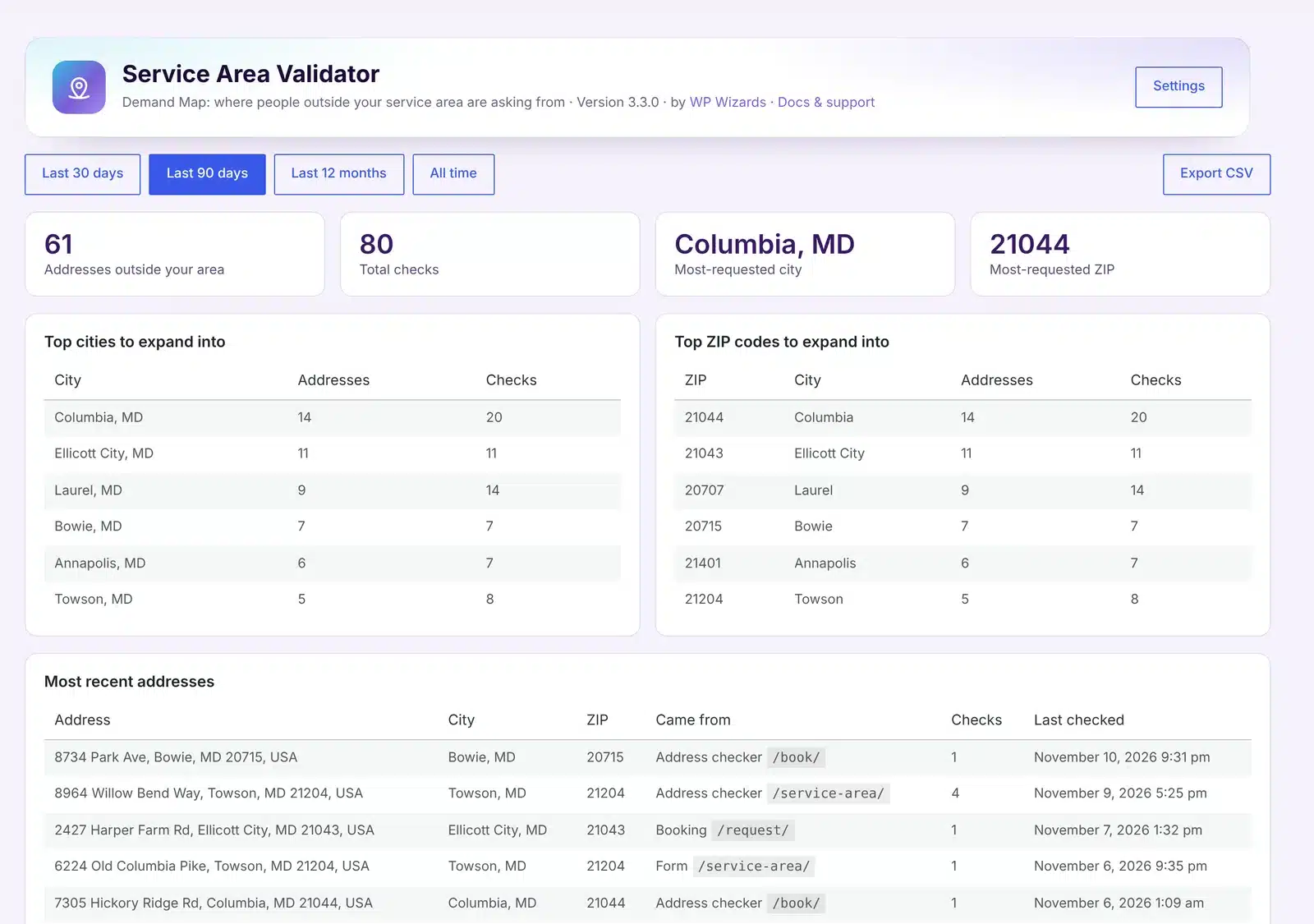
Open Service Area → Demand Map and you get:
- A map with a dot for every out-of-area address, drawn over your current service area. Bigger dots mean an address was checked more than once. Clusters jump out right away.
- Top cities to expand into, ranked by how many different addresses asked.
- Top ZIP codes to expand into, for when a city is too broad.
- The most recent addresses, with which page or form each one came from.
- Filters for the last 30 days, 90 days, 12 months or all time, and a CSV export for your own spreadsheets.
4 ways to use it to expand your service area
A few ways our clients can put this to work:
- Find the cluster at your border. If most of your out-of-area dots sit just past your boundary in one direction, extending the line a few miles may pay for itself.
- Test before you commit. Thinking about a second location or another crew? Compare 90 days of demand in each candidate area before you expand your service area.
- Price the trip. If a far-away town keeps asking, you can add a higher travel band there instead of saying no.
- Aim your marketing. When you do expand your service area, you already know which ZIP codes to target with ads and local pages first.
What it stores, and what it doesn’t
We kept this deliberately simple. The Demand Map saves only the address that was checked. No names, no emails, no phone numbers and no IP addresses. You choose how long addresses are kept (a year by default), you can delete them all with one click, and you can turn recording off entirely.
The plugin also adds suggested wording to WordPress’s privacy policy guide, so you can tell visitors plainly what’s saved and why. We’re not lawyers, so if you have specific privacy obligations, check the wording with yours.
A few other details worth knowing:
- Checks you make while logged in as an administrator aren’t counted, so your own testing doesn’t skew the numbers.
- The same address checked again adds to its count instead of creating a duplicate.
- If your service area map fails to load, nothing is recorded. An address only counts when it was really checked and really outside.
How to get it
The Demand Map is included in Service Area Validator 3.3. There’s nothing to set up: update the plugin and it starts recording the data you need to expand your service area. If you already use the address checker or the Gravity Forms check, your first dots will appear as soon as someone outside your area tries to book.
New to the plugin? See Service Area Validator and pricing. It’s free for active WP Wizards clients, and it’s part of All-Access.
Want us to set it up, or need something built around how your business works? Reach out to us, or read about our custom plugin development.
FAQ
Does the customer see anything different?
No. They see the same out-of-area message they always did.
Do I need WooCommerce or Gravity Forms?
No. The Demand Map works with the address checker on its own. It also records from Gravity Forms and WooCommerce booking quotes if you use them.
Will it slow my site down?
No. Saving an address is one small background request, and only when an address is outside your area.
Can I export the addresses?
Yes. Export any date range to CSV from the Demand Map screen.
Can I turn it off?
Yes. There’s a single checkbox on the Demand Map screen, and a button to delete everything that’s been recorded.