
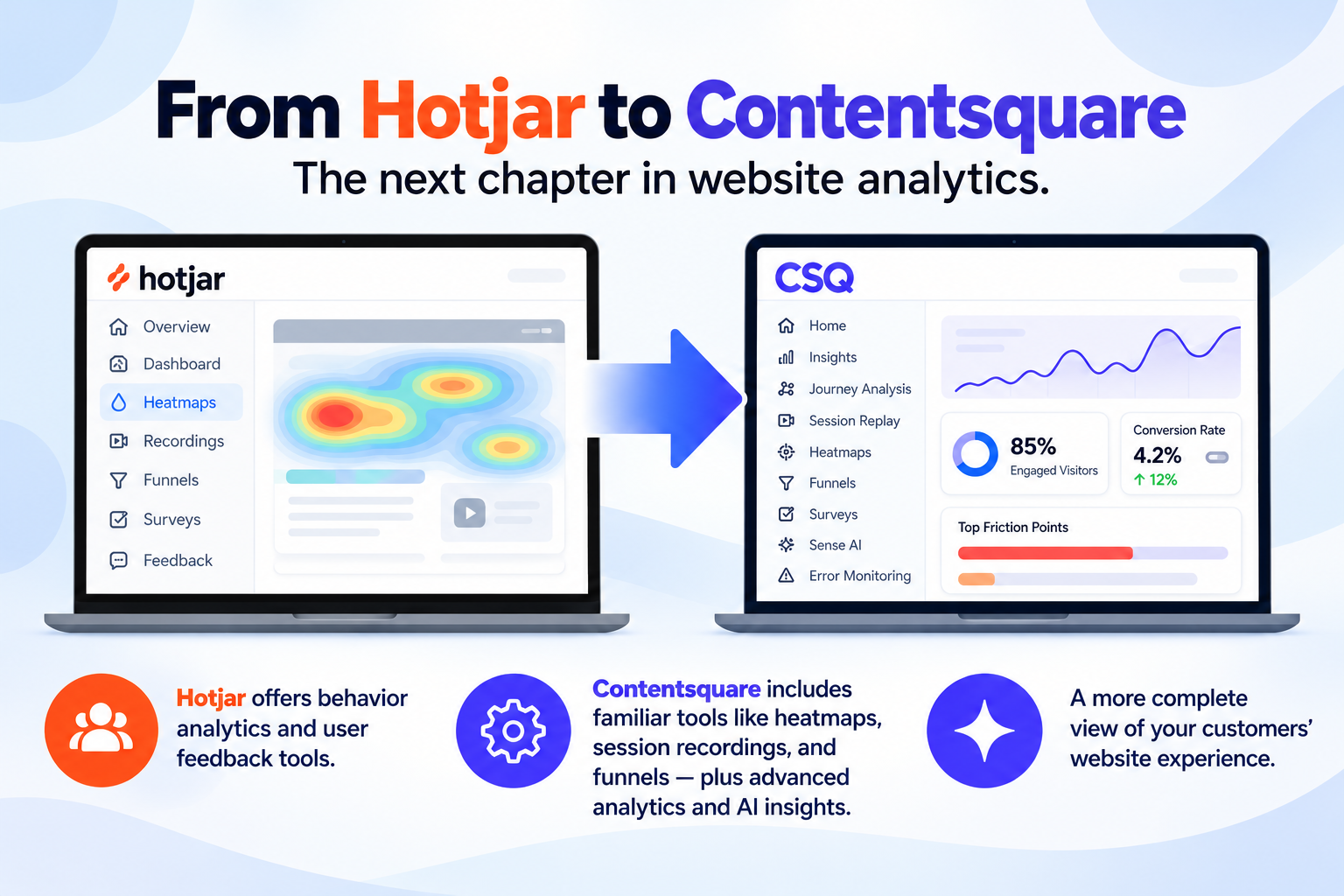
Hotjar is transitioning existing customers to Contentsquare, the broader digital experience analytics platform that acquired Hotjar in 2021. Affected accounts receive a 30-day transition period to explore Contentsquare before it becomes their primary platform. While existing tracking code continues working, historical Hotjar analytics data does not automatically transfer, subscription pricing and session allowances may change, and certain website settings require attention.
We’ve started hearing from businesses receiving emails about Hotjar moving to Contentsquare. If you’ve received one of these notifications and aren’t sure what it means for your website, you’re not alone.
At WP Wizards, we believe business owners should understand the tools collecting information about their websites, especially when changes could affect analytics, subscription costs, or historical data.
The move from Hotjar to Contentsquare is more than a new name or redesigned dashboard. It introduces new analytics capabilities, different subscription structures, and important considerations for businesses that rely on Hotjar to understand how visitors interact with their websites.
The good news is that you won’t necessarily need to reinstall tracking code or rebuild your analytics setup to begin using Contentsquare. However, there are several things worth reviewing before your transition deadline, particularly your existing data, pricing, privacy settings, and connected integrations.
Ready to Transform Your Website?
Let our team at WP Wizards bring your vision to life — from design and development to SEO and automation. Tell us about your project below!
Request a Quote
"*" indicates required fields
In this guide, we’ll explain what’s changing, what stays the same, and what steps we recommend taking to make the transition as smooth as possible.
What Is Hotjar, and How Does It Track User Behavior?
Before discussing the move to Contentsquare, it helps to understand what Hotjar does and why so many businesses rely on it.
How Hotjar Helps Businesses Understand Website Visitors
Traditional analytics tools can tell you how many people visited a page, where they came from, and whether they completed a conversion. Hotjar goes further by helping explain what those visitors actually did once they arrived.
For example, imagine 500 people visit your homepage, but only a handful contact your business. You know your website is attracting traffic, but the numbers alone don’t explain why so few visitors are taking action.
Hotjar’s behavioral data can reveal whether visitors are scrolling past important information, struggling to find your contact button, or clicking elements that aren’t interactive.
These insights help business owners, digital marketers, and UX designers make better decisions about website user experience, navigation, and conversion optimization.
For WordPress websites, WooCommerce stores, and professional service businesses, this information can be especially useful when identifying opportunities to improve lead generation and sales.
Hotjar Heat Maps, Session Recordings, and Visitor Behavior
Hotjar became widely recognized for its visual analytics tools, particularly heatmaps and session recordings.
These features help businesses understand how users interact with specific pages rather than relying entirely on traffic statistics.
Heat Maps
Heat maps visually represent visitor interactions across a webpage. They help businesses understand which areas receive attention and which elements visitors tend to ignore.
Different heatmap views can reveal different types of behavior:
- Click heatmaps show where users click, including buttons, links, navigation menus, and other page elements.
- Scroll heatmaps reveal how far visitors scroll down a page, helping identify whether important content is being seen.
- Movement heatmaps visualize cursor movement where supported, providing additional clues about visitor engagement.
Heatmaps can also be analyzed across different device types, including desktop, tablet, and mobile.
Session Recordings
Session recordings, sometimes called visitor recordings, reconstruct individual website sessions so businesses can review how visitors navigate their sites.
These recordings can reveal issues such as confusing navigation, repeated clicks, unexpected scrolling behavior, or difficulties completing important actions.
Businesses can also filter relevant recordings by criteria such as device type and traffic source, depending on the available features.
Form Analysis and Conversion Funnels
Hotjar’s behavioral analytics and funnel-related tools can help businesses identify where users abandon forms, checkout processes, or other multistep interactions.
For example, a WooCommerce website might discover that customers regularly abandon checkout after reaching the shipping information section.
Understanding where these drop offs occur provides an opportunity to investigate friction points and improve the conversion rate.
Hotjar User Feedback, Feedback Polls, and Surveys
Hotjar also offers feedback tools that help businesses collect information directly from website visitors.
While heatmaps and session recordings show what visitors do, user feedback can help explain why they do it.
Hotjar’s feedback features have included:
- On-site feedback widgets that allow visitors to share their experience.
- A five-level emoticon rating system for measuring user satisfaction.
- Feedback polls that collect opinions about specific pages or website experiences.
- Surveys with options such as Net Promoter Score (NPS) questions.
- Exit-intent surveys that gather feedback from visitors preparing to leave, where supported.
Hotjar also historically offered Engage, a user research product that supported participant recruitment and customer interviews.
These capabilities help businesses collect qualitative information about customer expectations, frustrations, and website usability.
For example, a session recording might show that someone repeatedly returns to a pricing page, while a survey could reveal that the visitor was having trouble understanding the available service packages.
Combining both types of information provides a more complete understanding of the customer experience.
Hotjar vs. Google Analytics: What’s the Difference?
Although Hotjar and Google Analytics both provide website insights, they serve different purposes.
Google Analytics focuses primarily on quantitative data, including website traffic, acquisition sources, engagement events, and conversions.
Hotjar focuses on behavioral and qualitative information, helping businesses understand how visitors interact with pages and where they may experience difficulties.
For example, Google Analytics might reveal that a landing page has a low conversion rate.
Hotjar’s heatmaps, feedback tools, and session recordings can help investigate whether confusing navigation, unclear messaging, or form usability issues contribute to that result.
Businesses often use Google Tag Manager to manage analytics tracking code and other website scripts from a centralized location.
At WP Wizards, we don’t just want to know how many people visit your website. We want to understand whether those visits lead to meaningful results for your business.
That’s where combining traditional analytics tools with behavioral insights becomes valuable.
Why Is Hotjar Moving to Contentsquare?
Contentsquare’s Acquisition of Hotjar
Contentsquare acquired Hotjar in 2021 to expand its digital experience analytics capabilities.
For several years, the two platforms operated independently, allowing Hotjar customers to continue using the tools and features they were familiar with.
Now, Contentsquare is consolidating the platforms into a more comprehensive analytics experience.
Rather than maintaining separate products, Contentsquare is transitioning Hotjar customers into its broader platform, which combines familiar behavioral analytics with additional tools for understanding website performance and customer journeys.
The migration is being introduced in phases, meaning different customers may receive their notifications and transition deadlines at different times.
What Is Contentsquare, and How Is It Different?
Contentsquare is a digital experience analytics platform designed to help businesses understand how visitors navigate and engage with their websites.
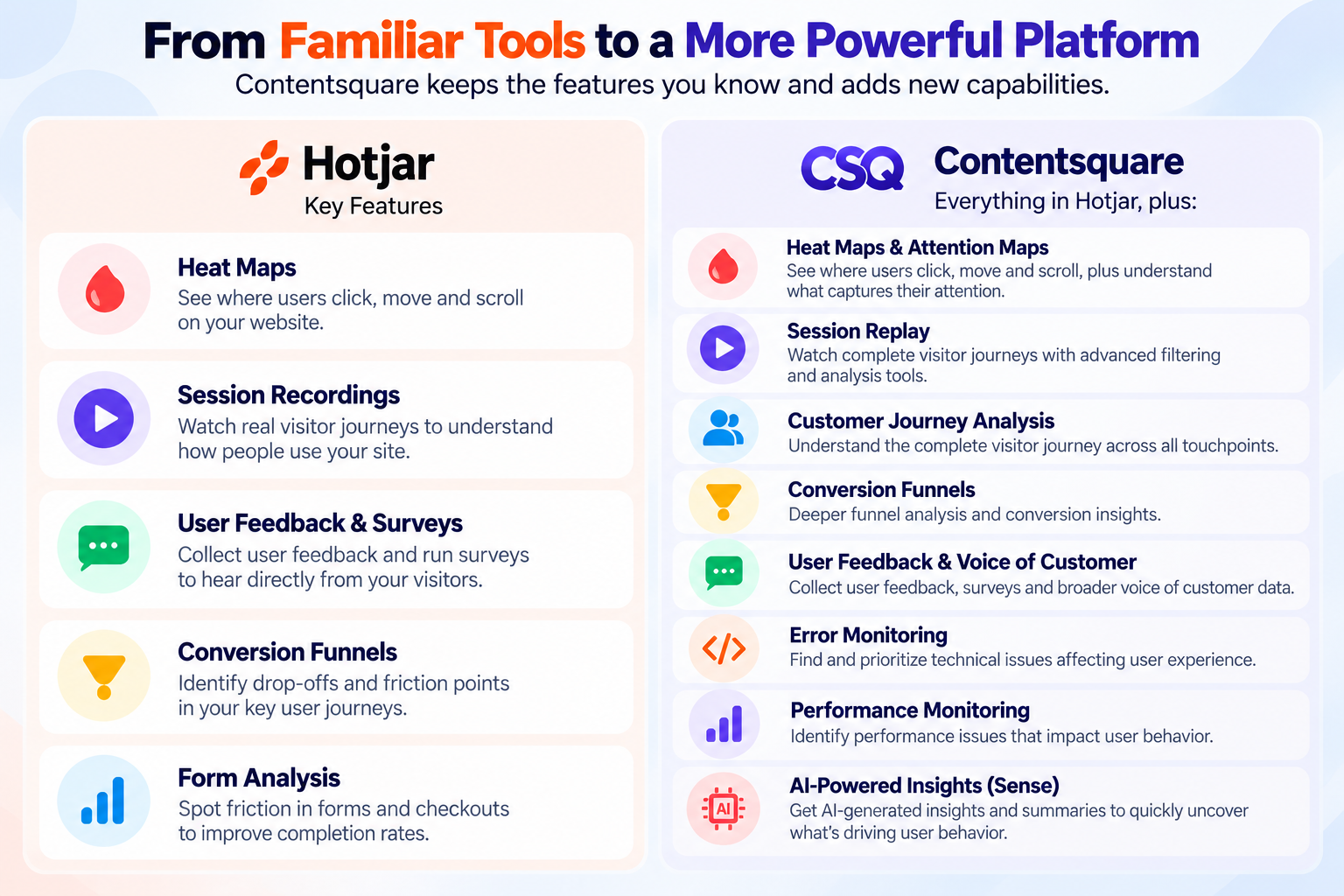
It includes familiar Hotjar capabilities while introducing additional features such as:
- Heatmaps and zone-based engagement analysis.
- Session Replay.
- Customer journey analysis.
- Conversion funnels and funnel analysis.
- Error monitoring and performance monitoring.
- Surveys and Voice of Customer feedback.
- AI-powered analytics through Sense.
- Supported integrations with other marketing and analytics tools.
One of the biggest differences is the ability to connect individual visitor interactions with broader customer journeys.
Instead of evaluating isolated recordings or specific pages, businesses can investigate how visitors move through their websites, where they encounter difficulties, and which issues may affect conversions.
For small businesses, the additional information can help guide website improvements. However, the practical value depends on which features are included in the subscription and how effectively the business uses the data.
Hotjar to Contentsquare: What’s Changing and What’s Staying the Same?
Although Contentsquare introduces a different platform experience, not everything about a customer’s existing Hotjar setup changes immediately.
Here’s a summary of the most important differences:
Category |
What’s Changing |
|---|---|
|
Primary platform |
Contentsquare replaces Hotjar for accounts that complete the transition. |
|
Existing tracking code |
Continues collecting data without a new installation during the initial migration. |
|
Heatmaps and recordings |
Similar functionality remains available through Contentsquare, although interfaces and limits differ. |
|
Advanced analytics |
New capabilities include customer journey analysis, error monitoring, performance monitoring, and AI insights. |
|
Historical data |
Previous Hotjar behavioral analytics do not automatically transfer. |
|
Surveys and feedback |
Existing data and configurations transfer when the migration completes. |
|
Subscription pricing |
Paid customers may receive different rates, discounts, and session allowances. |
|
Billing |
New pricing generally begins at the next scheduled renewal. |
|
Privacy configurations |
Some settings carry over, but cookie consent and certain tracking settings require review. |
|
Integrations |
Some connected services must be reconfigured and certain workflows are no longer supported. |
|
Hotjar account |
Becomes read-only for 12 months after the switch. |
|
Opt-out |
Account owners can choose to remain on Hotjar before their individual deadline. |
The most important takeaway is that the migration is automatic unless the account owner opts out.
Even though Contentsquare uses your existing tracking code, we recommend reviewing your subscription details, historical data, and website configurations rather than assuming every setting will carry over unchanged.
When Will Hotjar Switch to Contentsquare?
Understanding the 30-Day Hotjar Transition Period
Hotjar is transitioning customers in phases rather than switching every account on the same date.
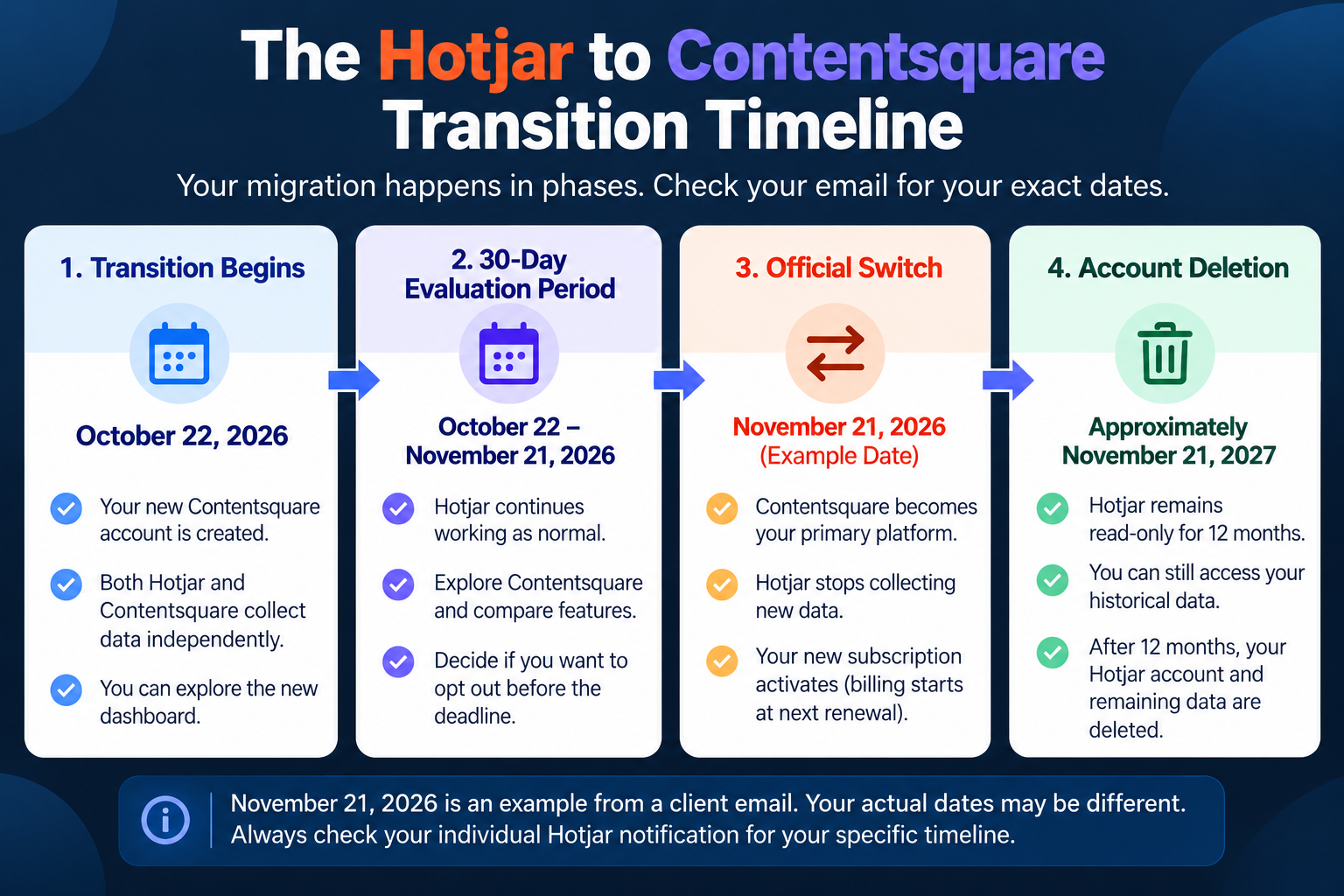
When your account is selected, you’ll receive a notification explaining when your transition begins and when Contentsquare will officially replace Hotjar as your primary platform.
Once the transition starts, you’ll receive access to a new Contentsquare account.
You can log in using your existing Hotjar credentials, although you’ll need to accept Contentsquare’s terms when accessing the platform for the first time.
During the 30-day transition period:
- Your existing Hotjar account remains active.
- Your Hotjar subscription and billing continue as normal.
- Contentsquare begins collecting new data through your existing tracking code.
- You can explore Contentsquare without an additional charge during the transition.
- Both platforms collect data independently.
- Changes made in Hotjar do not automatically synchronize with Contentsquare.
- New sites created in Hotjar after the Contentsquare account is generated will not automatically appear in Contentsquare.
- Your Contentsquare plan cannot be changed during the evaluation period.
This gives businesses an opportunity to explore the new dashboard, compare features, and decide whether the migration makes sense for their needs.
What Happens After the 30 Days?
If the account owner does not opt out before the deadline, the transition proceeds automatically.
At that point:
- Contentsquare becomes the primary analytics platform.
- The new Contentsquare Growth subscription activates for affected paid accounts.
- Hotjar stops collecting new analytics data.
- The original Hotjar account becomes read-only for 12 months.
- The existing Hotjar sites become Contentsquare projects.
- The Hotjar subscription ends.
- The first Contentsquare payment is scheduled for the next applicable renewal date.
- The original Hotjar account and its remaining data are deleted after the read-only period.
Existing migrated projects remain included for the initial 12 months, even if the account includes more projects than the normal plan allowance. After that period, standard subscription limits apply.
For example, one migration notification we reviewed identifies November 21, 2026, as the official switch date. That account’s 30-day evaluation period began in October 2026.
However, that date is not universal.
Your actual deadline is the date listed in your own Hotjar notification.
Can You Opt Out and Continue Using Hotjar?
Yes. Hotjar currently allows affected account owners to opt out of the transition before their individual deadline.
To do this, the account owner must log into Hotjar, select Learn more from the migration notification, and follow the opt-out instructions.
Only the designated account owner can make that decision.
If you’re unsure who owns your Hotjar account, you can check the Team section inside your dashboard.
According to Hotjar’s migration guidance, opting out allows your existing Hotjar subscription and account experience to continue.
Your new Contentsquare account and its collected transition-period data will then be removed according to the applicable terms.
However, once the 30-day transition period ends without an opt-out, the migration becomes final under the announced process.
We recommend reviewing the proposed subscription and available features before deciding whether to proceed.
What Hotjar Features Are Changing With Contentsquare?
Contentsquare retains many of Hotjar’s recognizable product features while adding more advanced analytics capabilities.
Heat Maps, Attention Maps, and Website User Experience
Heatmap functionality remains available in Contentsquare.
The platform also provides zone-based heatmaps, which divide webpages into identifiable sections for more detailed analysis.
Rather than simply looking at where users click, businesses can evaluate how individual elements perform.
For example, you might compare engagement with a homepage banner, navigation menu, product image, or contact button.
These attention and engagement insights can help identify opportunities to improve page layouts, calls to action, and the overall user experience.
For businesses using their websites to generate leads or online sales, understanding which elements attract attention can be a valuable part of conversion optimization.
Session Replay and Session Recordings
Contentsquare’s Session Replay provides functionality similar to Hotjar’s session recordings.
The tool reconstructs visitor sessions, allowing businesses to review how users navigate their websites and where they may encounter difficulties.
You can use relevant recordings to investigate:
- Visitors repeatedly clicking elements that do not respond.
- Navigation issues on mobile devices.
- Unexpected behavior on important landing pages.
- Problems with forms and checkout processes.
- Users leaving before completing a desired action.
One significant difference involves session allowances.
Hotjar uses dynamic sampling, which can reduce the number of captured sessions based on traffic and subscription limits.
Contentsquare collects 100% of eligible sessions for analytics within the limits of the applicable plan.
However, not every analytics session will have a Session Replay recording available. Contentsquare maintains separate replay allowances.
This means businesses should compare both analytics session limits and replay availability when reviewing their new subscription.
Conversion Funnels and Funnel Analysis
Conversion funnels help businesses understand the steps visitors take before completing an important action.
That action might be purchasing a product, submitting a contact form, booking an appointment, or requesting an estimate.
Funnel analysis identifies where visitors drop off before completing the process.
For example, a WooCommerce store might discover that shoppers regularly leave after reaching the shipping information stage.
A professional service website might find that visitors open an appointment form but rarely complete it.
These insights allow businesses to investigate possible friction points instead of guessing why conversions are low.
By identifying where problems occur, businesses can prioritize changes that may improve the customer experience and conversion rate.
Error Monitoring and Performance Monitoring
One of Contentsquare’s notable additions is its broader approach to error monitoring and performance monitoring.
These tools can help businesses identify technical problems that interfere with website usability.
Examples include:
- JavaScript errors affecting interactive features.
- Website elements that fail to function correctly.
- Slow-loading content.
- Performance issues affecting navigation.
- Technical problems contributing to visitor frustration.
The ability to connect error monitoring with behavioral insights is particularly useful.
For example, if multiple visitors struggle to complete a checkout process, a session recording might show the difficulty while error monitoring helps identify a technical cause.
This can help development and marketing teams investigate issues more effectively.
For businesses relying on their websites for appointments, inquiries, or online sales, identifying technical problems before they affect more customers is especially important.
Sense Analyst and AI-Powered Insights
Contentsquare also introduces artificial intelligence capabilities through Sense.
Sense is designed to help businesses analyze website activity and identify opportunities without manually reviewing every recording or report.
Depending on the subscription, capabilities include:
AI-Generated Summaries
Contentsquare can summarize information from heatmaps and session recordings, helping teams identify repeated behavior patterns and potential website issues.
Sense Chat
Users can ask questions about website activity in everyday language.
For example, a business might ask why visitors are abandoning a particular page or where users appear to struggle during checkout.
Sense Analyst
Eligible subscription tiers include access to Sense Analyst capabilities, with the Growth plan currently advertising a limited beta version.
MCP and AI Integrations
Contentsquare also supports integrations that can connect analytics information with compatible AI assistants, including ChatGPT and other supported tools.
These advanced features may help businesses analyze data more efficiently.
At WP Wizards, however, we believe the real value comes from using those insights to make meaningful website improvements.
Collecting more information is only beneficial when it helps you make better decisions.
What Happens to Your Existing Hotjar Data and User Feedback?
This is one of the most important parts of the transition, especially for businesses that use Hotjar to monitor website performance over time.
Your historical Hotjar behavioral analytics will not automatically transfer into Contentsquare.
Will Your Historical Heatmaps and Recordings Transfer?
No. Existing Hotjar behavioral analytics remain in your original Hotjar account rather than moving into the new Contentsquare dashboard.
This includes historical information associated with:
- Heatmaps.
- Session recordings.
- Conversion funnels.
- Dashboards.
- Saved behavioral analyses.
Contentsquare begins collecting its own analytics data when the new account becomes active.
Your existing Hotjar reports do not disappear immediately, however.
After your official migration, your Hotjar account remains accessible in read-only mode for 12 months.
During that time, you can review and export historical information.
Once the 12-month period ends, your original Hotjar account and associated data are permanently deleted.
For businesses that rely on historical analytics to evaluate website changes, this is an important consideration.
Will Hotjar Surveys and Feedback Tools Still Work?
Survey and feedback information is handled differently from historical behavioral analytics.
According to Hotjar, existing surveys, feedback data, and related configurations transfer to Contentsquare when the migration is completed.
Contentsquare groups these tools under its Voice of Customer functionality.
During the transition period, customers can continue using their existing Hotjar surveys.
Selecting Voice of Customer inside Contentsquare during this period directs users to the Hotjar survey interface.
Once the migration finishes, survey and feedback data move into Contentsquare.
We recommend reviewing your active surveys, feedback widgets, and targeting configurations after the transition to confirm everything works as expected.
What Data Should You Save Before Leaving Hotjar?
We recommend reviewing your existing analytics and identifying information worth preserving before the read-only period ends.
This may include:
- Heatmaps showing how visitors engage with important pages.
- Session recordings documenting recurring usability problems.
- Historical funnel reports and conversion patterns.
- Data used to evaluate previous website redesigns.
- Reports showing changes in visitor behavior.
- Findings from important landing pages, product pages, or service pages.
- Information needed for future before-and-after comparisons.
Not every business needs to preserve every recording or report.
However, if you’ve invested time in reviewing Hotjar data and identifying website improvements, keeping those findings can help protect the value of that work.
At WP Wizards, we recommend treating historical analytics as part of your website’s ongoing performance record.
How Much Does Hotjar Cost, and What’s Changing With Contentsquare Pricing?
Subscription pricing is another important consideration, particularly for businesses currently paying for Hotjar.
Contentsquare does not simply replace each customer’s existing Hotjar plan with an identical subscription.
Some businesses may receive different prices, session allowances, and feature limits.
Is Hotjar Free to Use?
Historically, Hotjar offered a free plan that included approximately 35 captured sessions per day, along with limited access to behavior analytics and feedback features.
For new customers, Contentsquare Free is now the primary entry point.
Existing Hotjar customers should review their migration notifications to understand how their individual plans are affected.
What Does the Contentsquare Free Plan Include?
Contentsquare currently advertises a Free plan at $0.
Its publicly advertised features include:
- Up to 200,000 monthly analytics sessions.
- One project.
- One month of analytics data access.
- Heatmaps.
- Session Replay.
- Conversion funnels.
- Basic surveys.
- Error and performance monitoring.
- Supported AI connections through MCP.
A credit card is not generally required to begin using the advertised Free offering.
The 200,000 monthly session allowance represents analytics sessions, not 200,000 guaranteed session recordings.
It’s also important not to confuse Contentsquare’s Free plan with Hotjar’s historical free subscription, since the two products use different collection methods and feature limits.
What Is the Contentsquare Growth Plan?
Contentsquare’s Growth plan is designed for businesses that need more advanced analytics capabilities.
As of October 2026, Contentsquare publicly advertises Growth starting at approximately $39 per month when billed annually, with pricing dependent on the selected session tier.
Features include:
- Everything available in the Free plan.
- 13 months of analytics data access.
- Three standard projects.
- Zone-based heatmaps.
- Customer journey analysis.
- Impact quantification.
- Sense AI Chat.
- AI-generated heatmap and replay summaries.
- Limited beta access to Sense Analyst.
The publicly advertised Growth plan supports a range of monthly session tiers, starting at 7,000 analytics sessions.
Higher session volumes and additional capabilities may involve different pricing or subscription tiers.
Will Existing Hotjar Customers Pay More?
Possibly.
Existing paid Hotjar customers receive personalized pricing information in their migration notifications.
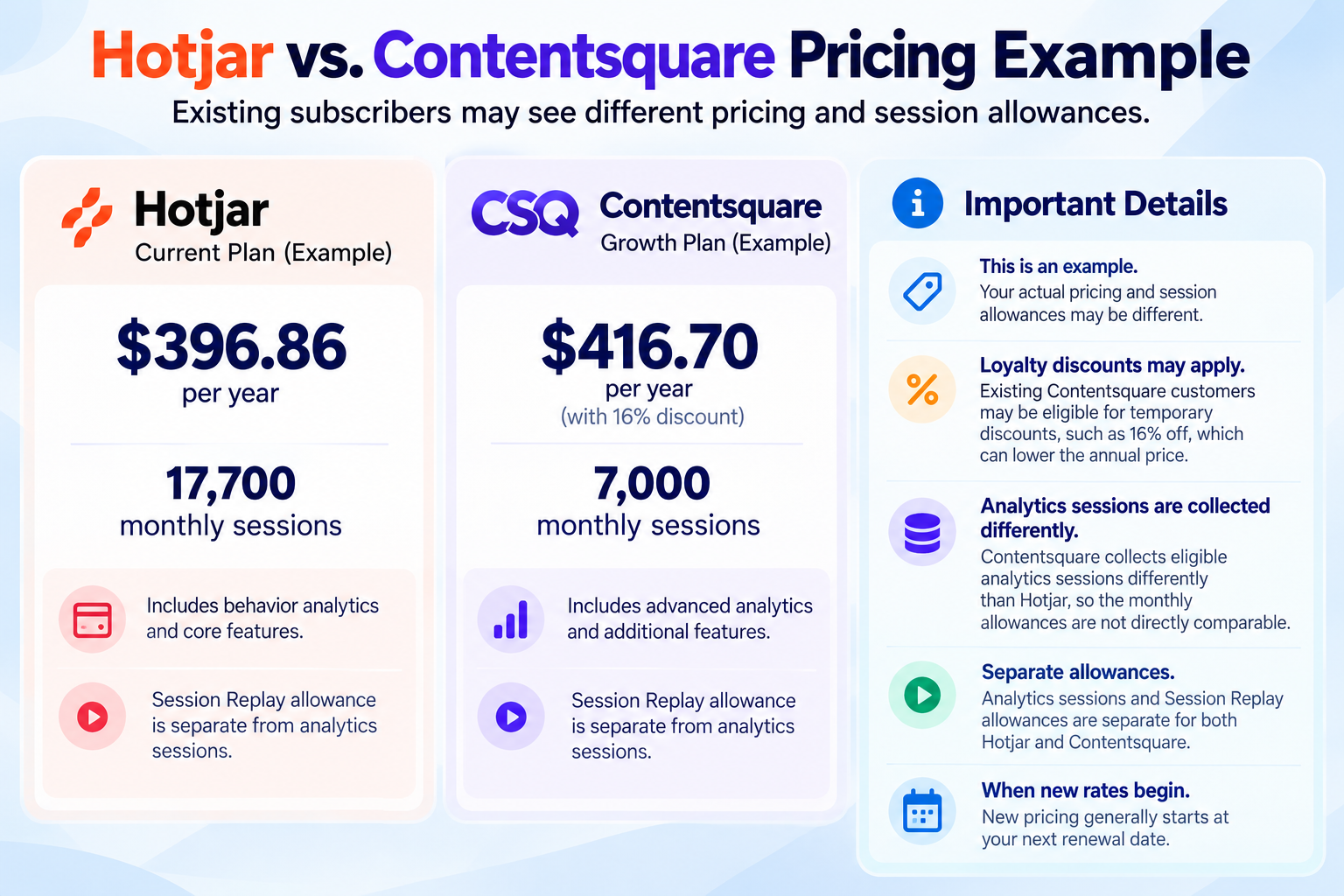
For example, one actual migration notification shows the following subscription change:
Subscription Detail |
Current Hotjar Plus |
New Contentsquare Growth |
|---|---|---|
|
Annual Price |
$396.86 |
$416.70 with introductory discount |
|
Monthly Session Allowance |
17,700 |
7,000 |
|
Loyalty Discount |
Not applicable |
16% for one year |
|
Standard Annual Price After Discount |
Not applicable |
$498.62 |
In this example, the discounted annual subscription is approximately 5% more expensive, while the stated monthly session allowance is lower.
However, this is not a direct comparison of identical data collection methods.
Hotjar uses dynamic sampling, while Contentsquare collects eligible analytics sessions at a 100% collection rate within plan limits.
Contentsquare also has separate allowances for Session Replay.
These prices and session allowances are specific to one customer’s migration offer and should not be interpreted as standard pricing for every Hotjar customer.
Another detail worth understanding is when the new rate actually takes effect.
The Contentsquare subscription activates at the end of the migration period, but customers generally won’t be charged the new rate until their next scheduled renewal.
In the example above, the subscription switches on November 21, 2026, but the new annual charge is scheduled for May 9, 2027.
The introductory loyalty discount is valid for one year, meaning the price may change again after the promotional period.
We recommend reviewing both your first Contentsquare renewal amount and the standard subscription rate before deciding whether to continue.
Do You Need to Update Your Hotjar Tracking Code or Google Tag Manager?
One of the biggest advantages of this transition is that existing Hotjar users generally don’t need to install entirely new tracking code to begin collecting data in Contentsquare.
However, some website configurations still require review.
Will Your Existing Hotjar Tracking Code Continue Working?
Yes.
Contentsquare uses the existing Hotjar tracking code to collect new data during the initial migration.
This applies to businesses that installed Hotjar manually or through a tool such as Google Tag Manager.
Your existing tracking setup should allow Contentsquare to begin collecting information without requiring your website to be retagged.
However, we recommend logging into your new Contentsquare dashboard and confirming that data is being collected correctly.
Do not manually delete your old Hotjar account after migrating.
Hotjar specifically warns that deleting the original account can interrupt Contentsquare tracking, even after the official switch.
Cookie Consent, Privacy Settings, and Website Tracking
This is one technical change businesses should not overlook.
Contentsquare introduces additional website cookies during the migration.
Both Hotjar cookie families, generally beginning with _hj, and Contentsquare cookies, generally beginning with cs, may be active during the transition.
Contentsquare does not automatically inherit the settings from your existing cookie consent banner or Consent Management Platform.
As a result, businesses may need to update their cookie management configuration to properly recognize and manage the new cookies.
Your privacy policy and cookie disclosures may also require review.
Some existing Hotjar privacy settings do carry over automatically.
For example, data suppression rules, element masking, and certain anonymization settings are applied to the corresponding Contentsquare projects.
However, existing Hotjar IP blocking settings do not transfer automatically.
If you’ve excluded internal office traffic, employees, or specific IP addresses from Hotjar tracking, you’ll need to review and recreate those exclusions in Contentsquare.
Websites using restrictive Content Security Policies may also need technical updates to allow the required tracking domains.
For privacy-conscious businesses, especially those operating in regulated industries, these settings deserve careful attention.
Integrations With Google Analytics and Other Marketing Tools
Contentsquare supports integrations with common analytics, marketing, and communication platforms.
Depending on the subscription, supported integrations include Google Analytics, Slack, Jira, Microsoft Teams, HubSpot, and Mixpanel.
However, existing Hotjar integrations should not be assumed to transfer automatically.
Contentsquare recommends reconnecting and reconfiguring integrations after the migration.
Some previously supported Hotjar workflows are not available in the same form, including certain integrations involving Zapier, Webhooks, and project management tools.
A few other differences are worth understanding:
- URL-based targeting rules transfer to Contentsquare.
- Event-based targeting rules do not automatically transfer.
- Contentsquare does not support Hotjar’s setting to exclude sessions shorter than 30 seconds.
- Sessions under 30 seconds can therefore count toward the analytics session allowance.
- Contentsquare blocks keystroke capture by default and does not allow it to be enabled.
These changes may affect how businesses configure tracking, interpret session totals, or connect their analytics with other platforms.
At WP Wizards, we recommend reviewing your website’s full analytics setup after the transition rather than assuming every configuration works exactly as it did in Hotjar.
What Does the Hotjar to Contentsquare Transition Mean for Your Customer Experience?
Although the migration introduces some important technical and subscription considerations, Contentsquare’s expanded analytics tools may also create opportunities for businesses to improve their websites.
The potential benefits depend on how the data is used.
For Small Businesses and Professional Service Websites
For service-based businesses, website analytics can help identify where potential customers encounter difficulties.
For example, a law firm, therapy practice, contractor, or consulting business may want to understand why visitors reach a service page but never complete the contact form.
Contentsquare can help investigate whether visitors are finding important information, interacting with calls to action, and navigating toward appointments or inquiries.
These insights can guide improvements to page structure, navigation, and lead generation.
For E-Commerce Websites and WooCommerce Stores
For e-commerce brands, understanding shopping behavior is particularly valuable.
Session Replay and conversion funnels can help identify issues involving product pages, shopping carts, shipping calculations, and checkout forms.
For example, a WooCommerce store may discover that customers repeatedly abandon checkout when unexpected shipping costs appear.
Another business may find that mobile users struggle with a particular payment field.
By reviewing these patterns, businesses can prioritize changes that may reduce friction and create a smoother shopping experience.
For Marketing Teams and Growing Businesses
For digital marketers, Contentsquare can complement existing analytics and reporting tools.
Google Analytics may show which campaigns generate traffic, while Contentsquare provides additional insights into what happens after visitors arrive.
Marketing teams can evaluate:
- Engagement with campaign landing pages.
- Behavior across different traffic sources.
- Navigation patterns on important service pages.
- Conversion funnel performance.
- Interaction with calls to action.
- Repeated friction points affecting the website experience.
When used together, these insights can help businesses make more informed decisions about website content, marketing campaigns, and conversion optimization.
At WP Wizards, we believe website analytics should support practical improvements, not just produce additional reports.
What Should Hotjar Users Do Before Moving to Contentsquare?
If you’ve received a migration email, we recommend taking the following steps before your account’s transition deadline.
Our Recommended Hotjar Migration Checklist
- Review your transition email. Confirm your account’s specific migration date, subscription details, and opt-out deadline.
- Log into Contentsquare. Use your existing Hotjar credentials, accept the applicable terms, and explore the new account.
- Compare subscription pricing. Review the proposed annual or monthly cost, introductory discounts, and future renewal rates.
- Review session limits. Compare analytics session allowances, Session Replay availability, project limits, and data retention periods.
- Preserve important historical information. Identify valuable Hotjar heatmaps, recordings, funnels, dashboards, and other reports you may need later.
- Check your surveys and feedback tools. Confirm that your active surveys and feedback configurations are available and functioning as expected.
- Verify website tracking. Make sure Contentsquare is collecting data from your website.
- Review your cookie consent configuration. Check whether your privacy and cookie settings account for the additional Contentsquare tracking cookies.
- Update technical settings when necessary. Review IP exclusions, integrations, targeting rules, Google Tag Manager, and Content Security Policy requirements.
- Confirm your project allowance. If your account includes multiple websites, check how your projects will be affected when the temporary 12-month allowance period ends.
- Decide whether to proceed or opt out. If you want to remain on Hotjar, the account owner must complete the opt-out process before the deadline.
- Contact WP Wizards if you need help. We can help you understand your analytics setup and identify website configurations that may need attention.
The most important thing is not to ignore the notification.
Although the platform migration itself is automatic, reviewing your account ahead of time can help you avoid unexpected subscription changes, missing historical information, or overlooked tracking configurations.
Frequently Asked Questions About Hotjar and Contentsquare
What Is Hotjar Used For?
Hotjar helps businesses understand how visitors interact with their websites. Its tools include heatmaps, session recordings, surveys, feedback widgets, and behavior analytics that help identify usability issues and opportunities for website improvement.
What Websites Use Hotjar?
Hotjar has been used by a wide range of websites, including WordPress business websites, WooCommerce stores, SaaS platforms, e-commerce brands, professional service providers, and marketing-focused websites. Any business interested in understanding visitor behavior may benefit from behavioral analytics tools.
Is Hotjar Being Discontinued?
Hotjar is being consolidated into Contentsquare as the primary analytics platform for migrating accounts. Existing customers are being transitioned in phases, although account owners currently have the option to remain on Hotjar by opting out before their migration deadline.
Is Hotjar Free to Use?
Hotjar historically offered a free plan with approximately 35 captured sessions daily. New customers are now directed toward Contentsquare Free, which provides a different set of analytics capabilities and usage limits.
How Much Does Hotjar Cost Per Month?
Historical Hotjar pricing depended on the subscription and session allowance. Existing paid customers moving to Contentsquare receive personalized pricing information in their migration notifications. Contentsquare currently advertises a Free plan and a Growth plan starting at approximately $39 per month when billed annually.
Is Contentsquare Free Really Free?
Yes. Contentsquare currently advertises a Free plan at $0, including up to 200,000 monthly analytics sessions, one project, one month of analytics data access, and access to several core analytics features. Specific limits apply to features such as Session Replay.
What Is the Difference Between Hotjar and Contentsquare?
Hotjar focused primarily on behavioral analytics, heatmaps, recordings, and user feedback. Contentsquare offers similar capabilities with additional features such as customer journey analysis, error and performance monitoring, advanced funnel analysis, and AI-powered analytics through Sense.
Will I Lose My Hotjar Session Recordings and Heatmaps?
Your historical Hotjar behavioral analytics will not automatically transfer into Contentsquare. However, your original Hotjar account remains accessible in read-only mode for 12 months after migration. We recommend exporting important information before that period ends.
Will My Hotjar Surveys and Feedback Data Transfer?
Yes. Hotjar confirms that existing survey and feedback data are transferred into Contentsquare’s Voice of Customer functionality when the migration is completed. Businesses should still review their active surveys and configurations afterward.
Do I Need to Install New Tracking Code for Contentsquare?
No. Contentsquare uses your existing Hotjar tracking code during the initial migration. However, you should still verify that data is being collected correctly and review any necessary cookie consent, privacy, integration, or technical settings.
Can I Use Contentsquare With Google Analytics?
Yes. Contentsquare supports integrations with Google Analytics on applicable plans. The two platforms can complement each other by combining traffic and conversion reporting with deeper insights into website behavior. Existing integrations may need to be reconnected.
Does Contentsquare Record Every Website Session?
Contentsquare collects 100% of eligible sessions for analytics within applicable plan limits. However, Session Replay has separate allowances, so not every analytics session will necessarily have a recording available for review.
Can I Stay on Hotjar Instead of Switching to Contentsquare?
Yes, if the designated Hotjar account owner opts out before the account’s migration deadline. The opt-out option is available through the migration notification inside the Hotjar dashboard. If no action is taken before the deadline, the transition proceeds automatically.
Will Contentsquare Cost More Than Hotjar?
It depends on your account. Existing paid customers receive personalized Contentsquare pricing and may have different subscription costs, session allowances, and introductory discounts. Check your migration email for the specific pricing and renewal date that applies to your business.
Is Contentsquare Better Than Hotjar for Small Businesses?
Contentsquare offers more advanced analytics capabilities, including AI-assisted insights, customer journey analysis, and error monitoring. However, whether it’s a better fit depends on your budget, website traffic, and how much you’ll use the additional features. Businesses with simpler analytics needs may place greater value on affordability and familiarity.
Need Help With the Hotjar to Contentsquare Transition? WP Wizards Can Help
The move from Hotjar to Contentsquare represents a significant change in how businesses collect, analyze, and use website behavior data.
While the transition introduces new features and more advanced analytics capabilities, it also brings important considerations involving historical information, subscription pricing, privacy configurations, and website integrations.
The good news is that you don’t have to figure everything out on your own.
At WP Wizards, we believe your website should do more than look good. It should help your business grow, connect with customers, and turn visitors into real opportunities.
As a Marine veteran-owned web development and digital marketing agency, we help businesses understand their websites, make informed decisions, and improve their online presence through WordPress development, SEO, marketing, and ongoing technical support.
If you’ve received a Hotjar migration notification and aren’t sure how Contentsquare will affect your website, we’re here to help.
Our team can help you review your analytics setup, identify important historical data, evaluate relevant tracking configurations, and understand the changes that may affect your business.
Whether you’re preparing for the transition or looking for ways to put your website analytics to better use, we can help you take the next step with confidence.
Contact WP Wizards to discuss your website and analytics needs.
Official Resources
For additional details about the transition, we recommend reviewing the official documentation:
- Hotjar: Moving from Hotjar to Contentsquare FAQs
- Contentsquare: Your New AI-Powered Analytics Platform
- Contentsquare Pricing and Plan Features
Pricing, features, and migration arrangements reflect information available in October 2026 and may change. Always refer to your individual account notification and current provider documentation for details specific to your subscription.